

Create the invoice
Set out the items, quantities and prices, then choose the due date and check the customer’s details.
Invoices & payments
Agree on the work, send the invoice and give your customer a way to pay. Keep the payment request in the conversation so your team can follow up with the details in view.
Online payments require a ready Stripe account and accepted payment fee terms. Processing fees apply.
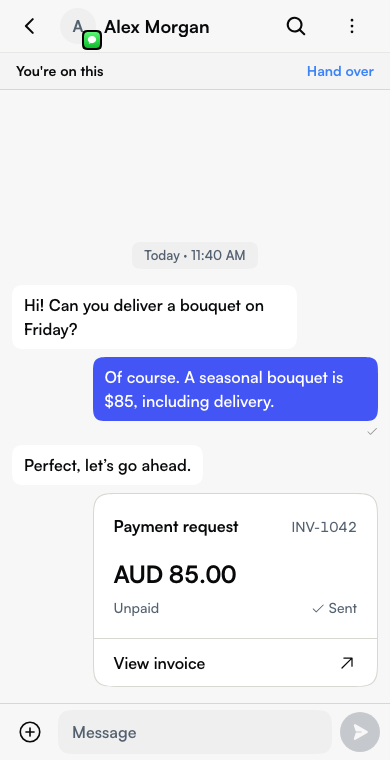
From agreement to payment
Once the customer agrees, create an invoice from the conversation. Add the work and price, check the details and send the payment request.
Set out the items, quantities and prices, then choose the due date and check the customer’s details.
Send it into the customer conversation or share the invoice link. The customer opens the invoice and pays online.
See the amount paid and what is still outstanding before you contact the customer again.
Setup and fees
Invoices are available with an active Phone plan. Connecting Stripe is free, with no extra payment subscription. Complete Stripe’s setup and accept the Seglo payment fee terms before issuing invoices and collecting payments.
Team follow-up
Open the invoice from its payment request to see the current status and balance. Your team can follow up from the same customer conversation, with the original agreement close by.
Explore the customer inboxGood questions.
No. An active Seglo Phone plan gives your business access to invoices. Connect a Stripe payment account and accept the payment fee terms before issuing invoices and taking online payments. Team members also need the appropriate invoice permissions.
Yes. Create the invoice from the conversation, check the customer and invoice details, then send it. The payment request appears in the conversation, with the invoice amount and status. You can also share the invoice’s payment link.
The customer opens the invoice link, reviews the amount and pays online through Stripe. They do not need the Seglo Phone app.
Connecting Stripe is free, with no extra payment subscription. Seglo charges 0.5% of each payment taken through Seglo with Stripe, including Tap to Pay, including GST. Stripe processing fees are separate. Accept the current fee terms in Payment account settings before connecting Stripe or collecting payments.
Yes. Check the invoice status, amount paid and remaining balance. Payment requests in a conversation link back to the invoice so your team can check the current details before following up.
Your next conversation starts here
One Australian number. Your team, on the phones they already have.
$149/month per number for 2 people · Priced per person, not per phone · $149 setup · Ex GST
$149 setup, then $149/month for two people. Extra people $39/month each, up to five. You pay per person, not per phone: each person can use as many phones and tablets as they like at no extra charge. Excludes GST, itemised on your invoice. Month to month; $0 exit charge. Minimum cost $298.
Critical Information Summary000 and 112 need power and internet. Emergency services receive your registered address, not your live location. Keep a mobile or fixed line available for outages. The app does not carry 106 voice calls.
Service termsFor everyday customer conversations. Bulk marketing uses the separate platform messaging channel. Broadcast-like sending is throttled.
Acceptable use